





[Thủ thuật WordPress] Cách loại bỏ dòng bản quyền dưới chân trang một số theme miễn phí – Bạn lục lọi trên mạng một số theme miễn phí wordpress và bạn “chộp” được một theme miễn phí rất ưng ý bạn tải về và tiến hành cài đặt cho giao diện trang Web của mình. Sau khi cài đặt xong bạn vào file footer để bỏ cái dòng bản quyền của theme đi và sau đó ra ngoài trang chính bạn Refresh để xem kết quả, tuy nhiên khi bạn Refresh thì nó lại hiện ra thông báo lỗi như sau?

Đại loại dòng thông báo đó là không cho phép bạn thay đổi liên kết và nội dung bản quyền này. Tuy nhiên bạn không muốn xuất hiện dòng bản quyền khó chịu này bạn muốn thay đổi lại thành cái của mình vậy có cách nào để có thể thay đổi nội dung bản quyền này không? Như vậy để giải quyết vướng mắt này hôm nay blog thủ thuật sẽ hướng dẫn các bạn cách loại bỏ thông báo lỗi này đi áp dụng cho tất cả theme wordpress miễn phí nhé!
Cách loại bỏ dòng bản quyền dưới chân trang một số theme miễn phí
Trong bài viết trước đây về thủ thuật WordPress mình có hướng dẫn các bạn cách vô hiệu hóa tính năng bình luận trên wordpress giúp bạn có thể loại bỏ tính năng trên WordPress một cách dễ dàng tiếp tục trong bài viết này mình sẽ hướng dẫn các bạn cách loại bỏ dòng bản quyền dưới chân trang một số theme miễn phí.
#1 Sửa từ giao diện
Đầu tiên bạn cần xác định các tập tin liên quan cần sử dụng bao gồm tập tin Functions.php, footer.php của giao diện đang sử dụng (đồng thời bạn cần phải nắm bắt được cách truy cập vào các tập tin bạn có thể tham khảo bài viết sửa giao diện, plugin WordPress không cần FTP hoặc bạn có thể tham khảo cài đặt và sử dụng phần mềm CuteFTP) > nhìn sang cột Menu bên phải kích chọn file Functions.php.

#Loại bỏ cảnh báo
Tiếp tục bạn tìm nội dung của đoạn code sau
function wp_initialize_the_theme_load() { if (!function_exists("wp_initialize_the_theme")) { wp_initialize_the_theme_message(); die; } } function wp_initialize_the_theme_finish() { $uri = strtolower($_SERVER["REQUEST_URI"]); if(is_admin() || substr_count($uri, "wp-admin") > 0 || substr_count($uri, "wp-login") > 0 ) { /* */ } else { $l = 'Designed by: SA Dating | Thanks to Iron Worker Jobs, Dog Trainers and Florida Personals'; $f = dirname(__file__) . "/footer.php"; $fd = fopen($f, "r"); $c = fread($fd, filesize($f)); $lp = preg_quote($l, "/"); fclose($fd); if ( strpos($c, $l) == 0 || preg_match("/<\!--(.*" . $lp . ".*)-->/si", $c) || preg_match("/<\?php([^\?]+[^>]+" . $lp . ".*)\?>/si", $c) ) { wp_initialize_the_theme_message(); die; } } } wp_initialize_the_theme_finish();
Và sau đó thay tất cả đoạn code trên bằng đoạn code này
function wp_initialize_the_theme_load() { if (!function_exists("wp_initialize_the_theme")) { wp_initialize_the_theme_message(); die; } } function wp_initialize_the_theme_finish() { $uri = strtolower($_SERVER["REQUEST_URI"]); if(is_admin() || substr_count($uri, "wp-admin") > 0 || substr_count($uri, "wp-login") > 0 ) { /* */ } else { /* */ } } wp_initialize_the_theme_finish();

Sau khi thay xong bạn nhấn Cập nhật tập tin. Và bây giờ bạn có thể thay đổi nội dung bản quyền dưới chân trang được rồi đấy.
#Tùy chỉnh code Footer
Bạn kích chọn file Footer.php ở cột Menu bên phải.

Sau đó tìm đoạn code liên quan và thay lại nội dung mà bạn mong muốn.
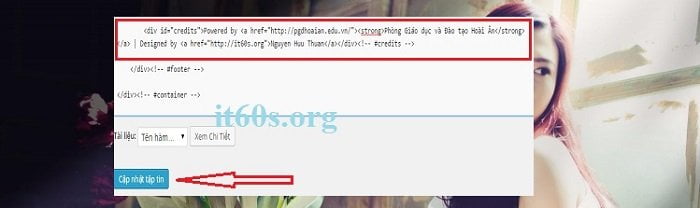
Thay xong bạn đừng quên Cập nhật tập tin. Và đây là kết quả thu được khi bạn loại bỏ thông báo lỗi nội dung bản quyền dưới chân trang.

#2 Sử dụng CSS làm ẩn
Vwosi phương pháp này chúng ta sẽ dùng code CSS để ẩn đi dòng dòng bản quyền dưới chân trang. Dĩ nhiên bạn cần biết chút code CSS.
Đầu tiên bạn cần xác đinh Class Footer bằng cách ngoài trang chủ WordPress > dùng trình duyệt Google Chrome kích chuột phải và chọn Inspect để xem mã trang Web, sau đó bạn hãy tìm đoạn mã dưới chân trang nó sẽ có tên là Footer và hãy xác định tên Class của Footer.
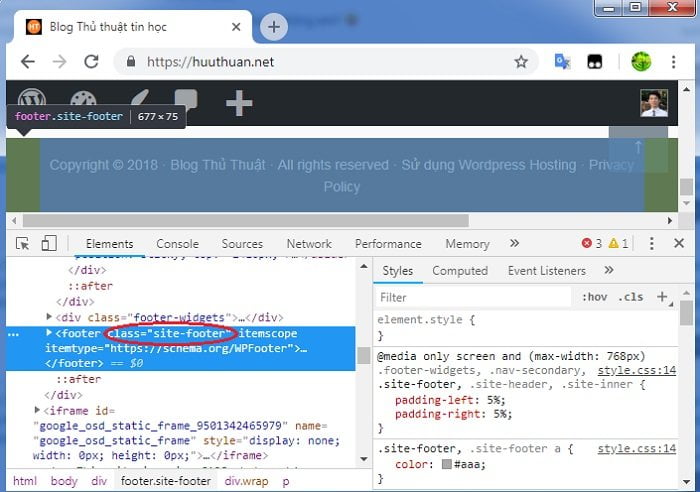
Như bạn thấy Footer của mình có tên Class là “Site-footer”. Sau đó trong trang quản trị WordPress hãy điều hướng theo menu Appearance > Customize > Additional CSS. Thêm dòng code như sau.
.site-footer{
display:none;
}
Hãy thay thế tên Class tương ứng mà bạn muốn làm ẩn. Thực hiện xong bạn sẽ nhìn thấy dòng chữ dưới chân trang biến mất.
#3 Sử dụng Plugin
Nếu bạn sợ đụng chạm đến mã nguồn thì có thể sử dụng Plugin để thay đổi, ưu điểm của việc sử dụng Plugin là bạn có thể tùy biến một cách dễ dàng không sợ mất khi có giao diện mới cập nhật. Với plugin Remove Footer Credit sẽ giúp bạn loại dòng bản quyền dưới chân trang một cách dễ dàng, bạn không cần lo lắng liệu plugin có ảnh hưởng hiệu suất website hay không. Đây là plugin đơn giản và nhẹ nhàng.
Đầu tiên bạn cài đặt và active plugin Remove Footer Credit. Tiếp theo đi tới Tools > Remove Footer Credit.
Ở đây plugin có 2 ô cho bạn nhập vào. Ô đầu tiên là dòng text bạn muốn loại bỏ. Ô thứ hai là dòng text bạn muốn thay thế. Nếu bạn không muốn hiển thị gì ở phần footer thì có thể để trống.
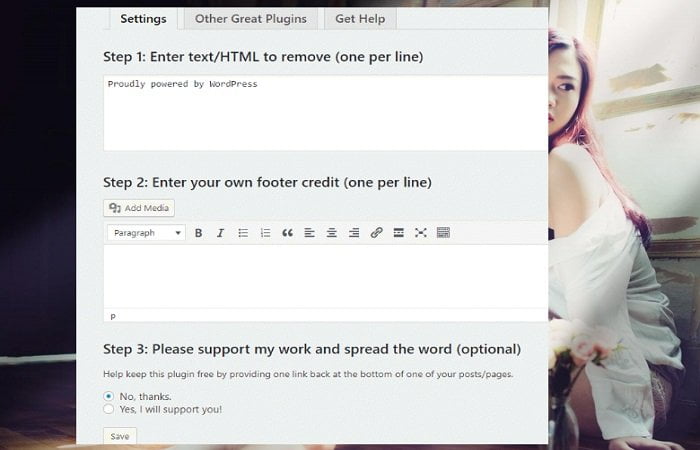
Nhớ click nút Save để lưu lại cấu hình của bạn. Ra giao diện trang chủ. Bạn sẽ nhận thấy dòng dòng chữ bản quyền dưới chân trang không còn nữa.
Như vậy là mình đã hướng dẫn các bạn cách loại bỏ nội dung bản quyền dưới chân trang một cách rất đơn giản và nhanh chóng rồi đấy nhé.
Cuối cùng không có gì hơn nếu bạn cảm thấy bài viết có ích hãy subscribe blog của mình thường xuyên để cập nhật những bài viết mới nhất qua Email – Chân thành cảm ơn!



Thuần ơi giúp mình loại bỏ ở themes hestia được không
Cảm ơn bạn đã đặt câu hỏi do bận công việc gia đình nên giờ mình mới trả lời bạn được. Bạn tìm trong File Footer.php thử xem có nội dung ở trang chính hay không và tiến hành thay đổi thôi bạn 😀
Chào bạn, bạn vui lòng cho mình xin sdt hoặc mail đc không ạ, cám ơn bạn nhiều. sdt mình: 0826282029
mail mình: thuanhuu0188@gmail.com nhé 😛 hoặc bạn có thể xem trong phần giới thiệu ấy 😛
a ơi giúp em với, em dùng theme miễn phí Wellington
em tìm hoài ko thấy a ơi
Mỗi theme có cấu trúc khác nhau bạn có thể tìm trong file Footer.php hoặc các file khác 😀
hi bạn . Mình dùng theme wrdpress và muốn xoá Copyright © 2017 . Proudly powered by WordPress & Corporate Business WordPress Theme by Dinozoom.com., mà mình tìm trong footer và function mãi không thấy để xoá, Bạn chỉ giúp mình với.
Bạn tìm trong các tập tin template xem sao bạn 😀
Mình vào fuction.php và footer.php cũng không thấy đoạn code bạn hướng dẫn. Bạn xem giúp mình với ạ, mình dùng theme Bakes And Cakes.
Bạn xem giúp mình ạ.
Đoạn code trong fuction.php :
get( ‘Version’ ) );
}
if (!function_exists(‘bakes_and_cakes_setup’)):
/**
* Sets up theme defaults and registers support for various WordPress features.
*
* Note that this function is hooked into the after_setup_theme hook, which
* runs before the init hook. The init hook is too late for some features, such
* as indicating support for post thumbnails.
*/
function bakes_and_cakes_setup() {
/*
* Make theme available for translation.
* Translations can be filed in the /languages/ directory.
* If you’re building a theme based on Bakes And Cakes, use a find and replace
* to change ‘bakes-and-cakes’ to the name of your theme in all the template files.
*/
load_theme_textdomain(‘bakes-and-cakes’, get_template_directory() . ‘/languages’);
// Add default posts and comments RSS feed links to head.
add_theme_support(‘automatic-feed-links’);
/*
* Let WordPress manage the document title.
* By adding theme support, we declare that this theme does not use a
* hard-coded tag in the document head, and expect WordPress to
* provide it for us.
*/
add_theme_support(‘title-tag’);
/*
* Enable support for Post Thumbnails on posts and pages.
*
* @link https://developer.wordpress.org/themes/functionality/featured-images-post-thumbnails/
*/
add_theme_support(‘post-thumbnails’);
/* Custom Logo */
add_theme_support( ‘custom-logo’, array(
‘header-text’ => array( ‘site-title’, ‘site-description’ ),
) );
// This theme uses wp_nav_menu() in one location.
register_nav_menus(array(
‘primary’ => esc_html__(‘Primary’, ‘bakes-and-cakes’),
));
/*
* Switch default core markup for search form, comment form, and comments
* to output valid HTML5.
*/
add_theme_support(‘html5’, array(
‘search-form’,
‘comment-form’,
‘comment-list’,
‘gallery’,
‘caption’,
));
/*
* Enable support for Post Formats.
* See https://developer.wordpress.org/themes/functionality/post-formats/
*/
add_theme_support(‘post-formats’, array(
‘aside’,
‘status’,
‘video’,
‘quote’,
‘link’,
));
// Set up the WordPress core custom background feature.
add_theme_support(‘custom-background’, apply_filters(‘bakes_and_cakes_custom_background_args’, array(
‘default-color’ => ‘ffffff’,
‘default-image’ => ”,
)));
//Custom Image Sizes
add_image_size(‘bakes-and-cakes-post-thumb’, 60, 60, true);
add_image_size(‘bakes-and-cakes-about-thumb’, 600, 400, true);
add_image_size(‘bakes-and-cakes-product-thumb’, 235, 235, true);
add_image_size(‘bakes-and-cakes-slider’, 1920, 500, true);
add_image_size(‘bakes-and-cakes-image-full’, 1139, 498, true);
add_image_size(‘bakes-and-cakes-image’, 750, 400, true);
add_image_size(‘bakes-and-cakes-staff-thumb’, 487, 527, true);
add_image_size(‘bakes-and-cakes-blog-thumb’, 280, 255, true);
add_image_size(‘bakes-and-cakes-events-thumb’, 255, 255, true);
}
endif;
add_action(‘after_setup_theme’, ‘bakes_and_cakes_setup’);
/**
* Return sidebar layouts for pages
*/
function bakes_and_cakes_sidebar_layout(){
global $post;
if( get_post_meta( $post->ID, ‘bakes_and_cakes_sidebar_layout’, true ) ){
return get_post_meta( $post->ID, ‘bakes_and_cakes_sidebar_layout’, true );
}else{
return ‘right-sidebar’;
}
}
/**
* Set the content width in pixels, based on the theme’s design and stylesheet.
*
* Priority 0 to make it available to lower priority callbacks.
*
* @global int $content_width
*/
function bakes_and_cakes_content_width() {
$GLOBALS[‘content_width’] = apply_filters(‘bakes_and_cakes_content_width’, 750);
}
add_action(‘after_setup_theme’, ‘bakes_and_cakes_content_width’, 0);
/**
* Adjust content_width value according to template.
*
* @return void
*/
function bakes_and_cakes_template_redirect_content_width() {
// Full Width in the absence of sidebar.
if( is_page() ){
$sidebar_layout = bakes_and_cakes_sidebar_layout();
if( ( $sidebar_layout == ‘no-sidebar’ ) || ! ( is_active_sidebar( ‘right-sidebar’ ) ) ) $GLOBALS[‘content_width’] = 1170;
}elseif ( ! ( is_active_sidebar( ‘right-sidebar’ ) ) ) {
$GLOBALS[‘content_width’] = 1170;
}
}
add_action( ‘template_redirect’, ‘bakes_and_cakes_template_redirect_content_width’ );
/**
* Register widget area.
*
* @link https://developer.wordpress.org/themes/functionality/sidebars/#registering-a-sidebar
*/
function bakes_and_cakes_widgets_init() {
register_sidebar(array(
‘name’ => esc_html__(‘Right Sidebar’, ‘bakes-and-cakes’),
‘id’ => ‘right-sidebar’,
‘description’ => ”,
‘before_widget’ => ”,
‘after_widget’ => ”,
‘before_title’ => ”,
‘after_title’ => ”,
));
register_sidebar(array(
‘name’ => esc_html__(‘Google Map Widget’, ‘bakes-and-cakes’),
‘id’ => ‘google-map’,
‘description’ => __( ‘Widget for Google map section( Use Text widget for Google Map ).’,’bakes-and-cakes’),
‘before_widget’ => ”,
‘after_widget’ => ”,
‘before_title’ => ”,
‘after_title’ => ”,
));
register_sidebar(array(
‘name’ => esc_html__(‘Footer First’, ‘bakes-and-cakes’),
‘id’ => ‘footer-first’,
‘description’ => ”,
‘before_widget’ => ”,
‘after_widget’ => ”,
‘before_title’ => ”,
‘after_title’ => ”,
));
register_sidebar(array(
‘name’ => esc_html__(‘Footer Second’, ‘bakes-and-cakes’),
‘id’ => ‘footer-second’,
‘description’ => __( ‘Here you can use text widget to display Contact Form.’,’bakes-and-cakes’),
‘before_widget’ => ”,
‘after_widget’ => ”,
‘before_title’ => ”,
‘after_title’ => ”,
));
register_sidebar(array(
‘name’ => esc_html__(‘Footer Third’, ‘bakes-and-cakes’),
‘id’ => ‘footer-third’,
‘description’ => ”,
‘before_widget’ => ”,
‘after_widget’ => ”,
‘before_title’ => ”,
‘after_title’ => ”,
));
}
add_action(‘widgets_init’, ‘bakes_and_cakes_widgets_init’);
/**
* Enqueue scripts and styles.
*/
function bakes_and_cakes_scripts() {
$query_args = array(
‘family’ => ‘Open+Sans:400,400italic,700|Niconne’,
);
$my_theme = wp_get_theme();
$version = $my_theme[‘Version’];
wp_enqueue_style(‘bakes-and-cakes-font-awesome’, get_template_directory_uri() . ‘/css/font-awesome.css’);
wp_enqueue_style(‘bakes-and-cakes-flexslider-style’, get_template_directory_uri() . ‘/css/flexslider.css’);
wp_enqueue_style(‘bakes-and-cakes-jquery-sidr-light-style’, get_template_directory_uri() . ‘/css/jquery.sidr.light.css’);
wp_enqueue_style(‘bakes-and-cakes-lightslider-style’, get_template_directory_uri() . ‘/css/lightslider.css’);
wp_enqueue_style(‘bakes-and-cakes-google-fonts’, add_query_arg($query_args, “//fonts.googleapis.com/css”));
wp_enqueue_style(‘bakes-and-cakes-style’, get_stylesheet_uri(), array(), BAKES_AND_CAKES_THEME_VERSION );
if( bakes_and_cakes_is_woocommerce_activated() )
wp_enqueue_style( ‘bakes-and-cakes-woocommerce-style’, get_template_directory_uri(). ‘/css/woocommerce.css’, array(‘bakes-and-cakes-style’), $version );
wp_enqueue_script(‘bakes-and-cakes-light-slider’, get_template_directory_uri() . ‘/js/lightslider.js’, array(), ‘1.1.5’, true);
wp_enqueue_script(‘bakes-and-cakes-flexslider’, get_template_directory_uri() . ‘/js/jquery.flexslider.js’, array(‘jquery’), ‘2.6.0’, true);
wp_enqueue_script(‘bakes-and-cakes-tab’, get_template_directory_uri() . ‘/js/tab.js’, array(), ‘20120206’, true);
wp_enqueue_script(‘bakes-and-cakes-same-height’, get_template_directory_uri() . ‘/js/sameheight.js’, array(), ‘20120206’, true);
wp_enqueue_script(‘bakes-and-cakes-sidr’, get_template_directory_uri() . ‘/js/jquery.sidr.js’, array(‘jquery’), ‘2.0.8’, true);
wp_register_script(‘bakes-and-cakes-custom’, get_template_directory_uri() . ‘/js/custom.js’, array(‘jquery’), BAKES_AND_CAKES_THEME_VERSION, true);
$slider_auto = get_theme_mod( ‘bakes_and_cakes_slider_auto’, ‘1’ );
$slider_loop = get_theme_mod( ‘bakes_and_cakes_slider_loop’, ‘1’ );
$slider_pager = get_theme_mod( ‘bakes_and_cakes_slider_control’, ‘1’ );
$slider_animation = get_theme_mod( ‘bakes_and_cakes_slider_animation’, ‘slide’ );
$slider_speed = get_theme_mod( ‘bakes_and_cakes_slider_speed’, ‘7000’ );
$animation_speed = get_theme_mod( ‘bakes_and_cakes_animation_speed’, ‘600’ );
$array = array(
‘auto’ => esc_attr( $slider_auto ),
‘loop’ => esc_attr( $slider_loop ),
‘pager’ => esc_attr( $slider_pager ),
‘animation’ => esc_attr( $slider_animation ),
‘speed’ => absint( $slider_speed ),
‘a_speed’ => absint( $animation_speed )
);
wp_localize_script( ‘bakes-and-cakes-custom’, ‘bakes_and_cakes_data’, $array );
wp_enqueue_script( ‘bakes-and-cakes-custom’ );
if (is_singular() && comments_open() && get_option(‘thread_comments’)) {
wp_enqueue_script(‘comment-reply’);
}
}
add_action(‘wp_enqueue_scripts’, ‘bakes_and_cakes_scripts’);
if ( is_admin() ) : // Load only if we are viewing an admin page
function bakes_and_cakes_admin_scripts() {
wp_enqueue_style( ‘bakes-and-cakes-admin-style’,get_template_directory_uri().’/inc/css/admin.css’, ‘1.0’, ‘screen’ );
}
add_action( ‘admin_enqueue_scripts’, ‘bakes_and_cakes_admin_scripts’ );
endif;
if( ! function_exists( ‘bakes_and_cakes_customizer_js’ ) ) :
/**
* Registering and enqueuing scripts/stylesheets for Customizer controls.
*/
function bakes_and_cakes_customizer_js() {
wp_enqueue_script( ‘bakes-and-cakes-customizer-js’, get_template_directory_uri() . ‘/inc/js/customizer.js’, array(‘jquery’), BAKES_AND_CAKES_THEME_VERSION, true );
}
endif;
add_action( ‘customize_controls_enqueue_scripts’, ‘bakes_and_cakes_customizer_js’ );
if ( ! function_exists( ‘bakes_and_cakes_excerpt_more’ ) && ! is_admin() ) :
/**
* Replaces “[…]” (appended to automatically generated excerpts) with … *
*/
function bakes_and_cakes_excerpt_more() {
return ‘ … ‘;
}
endif;
add_filter( ‘excerpt_more’, ‘bakes_and_cakes_excerpt_more’ );
if ( ! function_exists( ‘bakes_and_cakes_excerpt_length’ ) ) :
/**
* Changes the default 55 character in excerpt
*/
function bakes_and_cakes_excerpt_length( $length ) {
return 50;
}
endif;
add_filter( ‘excerpt_length’, ‘bakes_and_cakes_excerpt_length’, 999 );
/**
* Query WooCommerce activation
*/
if ( ! function_exists( ‘bakes_and_cakes_is_woocommerce_activated’ ) ) {
function bakes_and_cakes_is_woocommerce_activated() {
if ( class_exists( ‘woocommerce’ ) ) { return true; } else { return false; }
}
}
/**
* Custom template tags for this theme.
*/
require get_template_directory() . ‘/inc/template-tags.php’;
/**
* Customizer additions.
*/
require get_template_directory() . ‘/inc/customizer.php’;
/**
* Custom functions that act independently of the theme templates.
*/
require get_template_directory() . ‘/inc/custom-functions.php’;
/**
* Custom functions for meta box.
*/
require get_template_directory() . ‘/inc/metabox.php’;
/**
*Rara Recent Post Widget.
*
*/
require get_template_directory() . ‘/inc/widget-recent-post.php’;
/**
*Rara Popular Post Widget.
*
*/
require get_template_directory() . ‘/inc/widget-popular-post.php’;
/**
*Social Media Widget.
*
*/
require get_template_directory() . ‘/inc/widget-social-links.php’;
/**
* Load Jetpack compatibility file.
*/
require get_template_directory() . ‘/inc/jetpack.php’;
/**
* Add theme compatibility function for woocommerce if active
*/
if( bakes_and_cakes_is_woocommerce_activated() ){
require get_template_directory() . ‘/inc/woocommerce-functions.php’;
}
/**
* Info Section
*/
require get_template_directory() . ‘/inc/info.php’;
?>
Đoạn code trong footer.php:
<?php
/**
* The template for displaying the footer.
*
* Contains the closing of the #content div and all content after.
*
* @link https://developer.wordpress.org/themes/basics/template-files/#template-partials
*
* @package Bakes_And_Cakes
*/
if(!is_page_template('template-home.php')){ echo '’; } ?>
Bạn đang dùng theme gì đó?
Dạ e đang dùng theme bakes and cakes ạ.
Bác lại thay đổi theme rồi hé 😀
xem giúp mình themes The BAKERY
Bạn vui lòng cho mình địa chỉ tải của theme
mình tải trong wordpress luôn đó bạn THuần ơi. hix
Bác tìm nó trong tập tin Footer.php đó rồi chỉnh lại 😀
Mình vào footer.php, fuction.php mà tìm không thấy.
Trang Web của bác là trang nào vậy?